# Quote tweet vs retweet: what each one does on X
https://postmoderno.io/blog/quote-tweet-vs-retweet · published 2026-11-24 · by Artem Senenko
A retweet, which X now calls a repost, shows someone's post to your followers unchanged. A quote tweet is a new post of your own with the original in a card under your words. What each looks like, what the original author gets, how X's ranking code weighs them, and which to use.
TL;DR:
- A retweet, now called a repost, shows the original post to your followers as its author wrote it. A quote tweet, now a quote, is a new post of yours with the original in a card below your text.
- You undo a repost and you delete a quote. X's help says a repost stops being available when the original post is deleted.
- Replies to a quote land on your post, and X does not add the original author to that conversation unless you mention them.
- In the ranking code X publishes, the chance that a viewer quotes a post weighs 5 and the chance they repost it weighs 1. Neither has moved since August 2026.
- A scheduling tool without an Enterprise contract sends a quote as a link, because since April 2026 the X API keeps its quote field for Enterprise customers.
A retweet shows someone's post to your followers exactly as it was written. A quote tweet is a new post of your own, with the original in a card under your words.
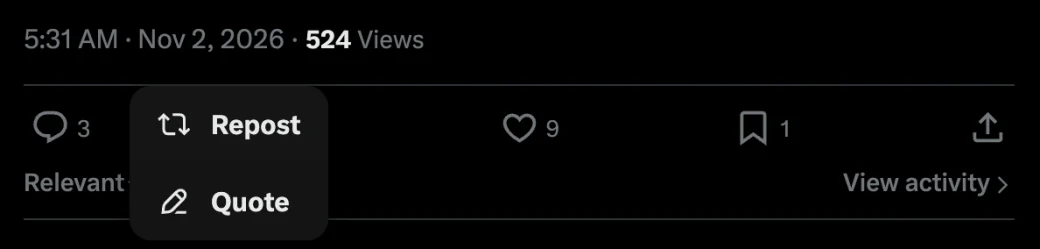
X now calls a tweet a post, a retweet a repost and a quote tweet a quote. Both sit in one menu: press the repost icon under a post and X offers the two choices.
The menu behind the repost icon on x.com, 24 November 2026.
We read X's app and help pages for this post on 24 November 2026.
## How they differ
| | Repost (retweet) | Quote (quote tweet) |
|---|---|---|
| What your followers see | The original post, marked with the repost icon and your name | Your text, with the original in a card below |
| A new post of yours | No | Yes |
| Your own words | None | Up to your full character limit |
| Your own media | None | Up to four photos, one GIF or one video |
| Taking it back | Undo the repost | Delete the post |
| Where the original lists it | Under Reposts | Under Quotes |
**A repost is not a new post. A quote is, so its replies, likes and views belong to your post and not to the original.**
## What a repost does
[X's help](https://help.x.com/en/using-x/repost-faqs) describes a repost as a normal post with its author's name and username, marked by the repost icon and the name of the person who reposted it. People who follow you can see it in their Home timeline. None of your own text goes with it.
To take one back, press the highlighted repost icon and choose Undo repost. That removes it from your profile and leaves the original alone.
If the original post is deleted, or its author's account is deleted or suspended, X's help says your repost is no longer available.
You can repost or quote your own posts, and X suggests it for an older post that has become relevant again. A follower can also turn off reposts from your account on your profile page. X describes that switch for reposts only.
## What a quote does
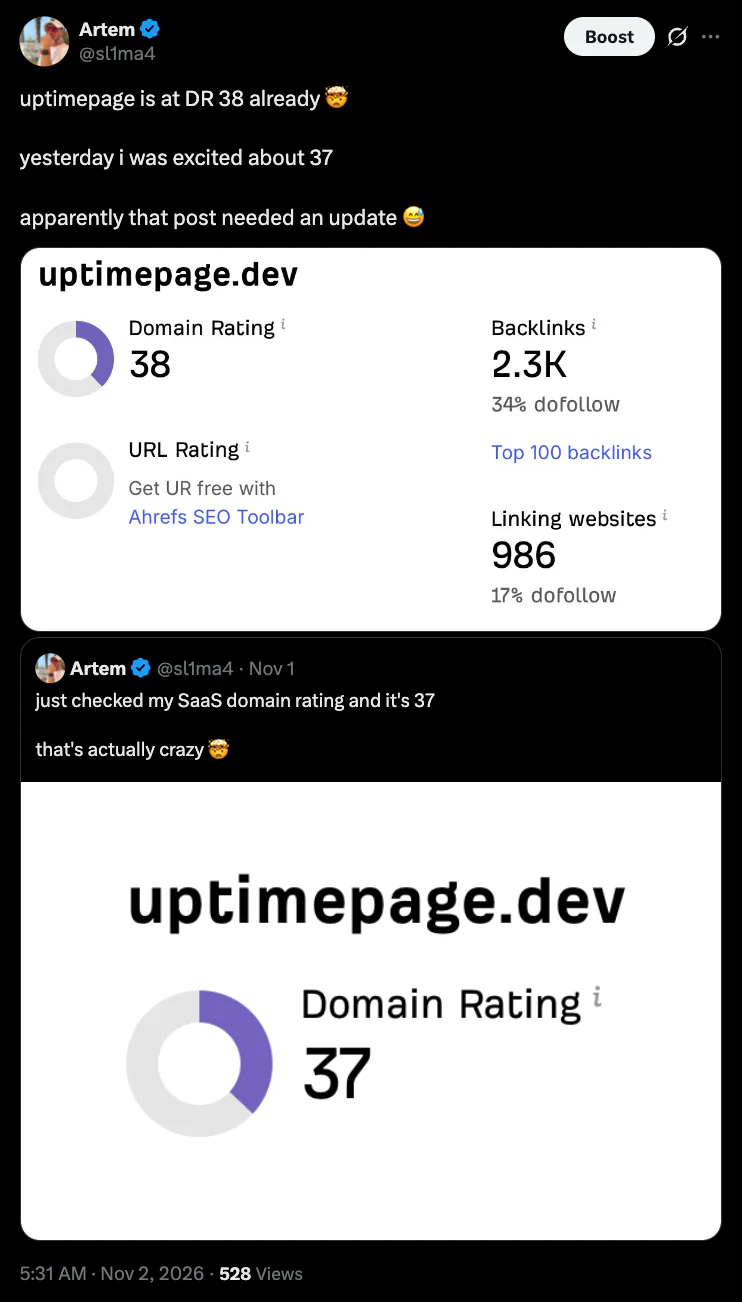
A quote is a post like any other, with its own address, replies, likes and view count. This one is from our founder's account: his words and image on top, the post he quoted in a card below.
A quote made in X. The card is the quoted post.
[X's help](https://help.x.com/en/using-x/how-to-repost) gives the rules:
- The quoted post does not count towards your character limit.
- You can add up to four photos, one GIF or one video.
- When someone replies to your quote, the original author is not added to the conversation. Mention them if you want them in it.
- To take a quote back, you delete it like any other post.
[How to quote a tweet](/blog/how-to-quote-a-tweet) has the steps.
## What the original author gets
X's help sends the author to the Notifications tab for both. It says the tab shows all activity on your posts, including which were reposted and by whom.
Under our own post, View activity opened a page with separate tabs for Quotes, Reposts and Likes. That is where an author reads what people wrote when they quoted the post.
X's ranking treats them differently as well. In [the code X publishes](/tools/x-algorithm-changelog), each action a viewer might take on a post has a weight, and X multiplies it by its prediction that the viewer will take that action:
| If X predicts a viewer will | Weight |
|---|---|
| Quote the post | 5 |
| Repost it | 1 |
Both weights have stood since X first published them on 13 August 2026. We read them on 24 November 2026.
They are weights on predictions, not on counts, and X's comments say a weight also reflects how rare an action is. So a quote is not worth five reposts. The numbers do say that X gives the chance of a quote more weight than the chance of a repost. [How the X algorithm works](/blog/how-the-x-algorithm-works) explains how to read them.
## What X's code does with a repost
The same code treats your repost differently from a post you wrote, which matters for your own reach:
- A repost made by an account the viewer doesn't follow is removed before X scores posts for that viewer's For You feed.
- The lift X gives a fresh post from a small account goes to an original post, not to a reply or a repost.
- A repost from an account the viewer does follow keeps about three quarters of its score. That figure sits in a file X updates late, so treat it as approximate.
All three come from [how the X algorithm works](/blog/how-the-x-algorithm-works), which links the files.
## Through a scheduler or the API
A quote made in X and a quote sent by a scheduling tool are not the same. Since April 2026 the X API keeps its quote field for Enterprise customers, so a tool without that contract quotes by putting the post's link at the end of your text. The link and the blank line before it take 25 characters, and a post with a link costs $0.20 through the API, where a plain one costs $0.015.
In our tests X still drew the quote card, with the link visible above it. X doesn't document that, so it can change. [How to quote a tweet](/blog/how-to-quote-a-tweet) shows the posts we tested, and how to schedule a quote in X's own scheduler, which holds it without a link.
On X, Postmoderno sends a quote as a link. Its preview shows the link and the quoted post's author and text before you confirm. It does not send plain reposts to X.
## Which one to use
| You want to | Use |
|---|---|
| Pass a post on as it is | Repost |
| Add your view, a correction or context | Quote |
| Bring back an older post of your own | Repost, or quote it to add something |
| Talk to the author | Reply |
| Send it later | Quote, from X's own scheduler or from a tool that sends it as a link |
## Common questions
### Is it still called a retweet?
X's menu says Repost and Quote, and its help pages say Repost and Quote post. The old names live on in X's own code, where the weight is still RetweetWeight, and in how people talk. Retweet and repost mean the same thing, and so do quote tweet and quote.
### What does quote tweet mean?
It means sharing someone's post inside a new post of your own. Your words go on top, and the original sits in a card below them.
### Does a quote count against my character limit?
Your own text does, and the post you quote doesn't. [The X character limit](/tools/x-character-counter#character-limit) lists the numbers. A quote sent as a link is different, because the link is part of your text.
### Can a protected post be reposted?
No. X's help says the posts of a protected account can't be reposted by anyone. If your own account is protected, you can still repost and quote, and only the followers you approved see it.
### Can I undo a quote the way I undo a repost?
No. You undo a repost from the repost icon. A quote is a post, so you delete it from its menu.
## Where to go next
[How to quote a tweet](/blog/how-to-quote-a-tweet) compares quotes sent from X and through the API, on real posts. The [X algorithm changelog](/tools/x-algorithm-changelog) lists every weight X publishes and when each one last moved. To schedule posts and quotes by asking for them, start with [how to schedule tweets from Claude or ChatGPT](/blog/schedule-tweets-from-claude-or-chatgpt).
A link that starts with / is on https://postmoderno.io.